

Model Gap Fix | No More Gaps on Items and Blocks
Model Gap Fix removes the tiny gaps and flickering lines on items and block models caused by vanilla texture zooming, without costing you a single frame.
 Fabric
 Forge
 NeoForge
 Quilt
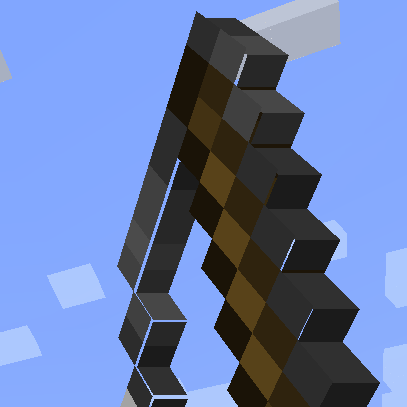
You pause mid-fight and spot it. A thin, see-through sliver runs down the edge of your held sword, and the corners of a nearby door model show pinholes of sky. That glitch is MC-73186, a long-running vanilla rendering bug, and Model Gap Fix by MehVahdJukaar exists to kill it. Around 34 million downloads later, plenty of players refuse to play without it.

Why Minecraft Models Show Tiny Gaps
Vanilla Minecraft shrinks every model face slightly when it maps a texture onto it. Mojang calls this texture zooming, and it was added to hide a different artifact called atlas bleeding, where the edge of one texture bleeds into its neighbor on the shared atlas. The trade-off is that the outer pixels of each face go unused, so faces stop meeting flush and gaps appear along edges and corners.
The issue is tracked on Mojang's bug tracker as MC-73186. It hits block models and item models alike, and possibly other model types that use the same functions. It shows up most on custom block models, doors, fences, and flat 2D items, where a missing pixel row reads as a flickering line.

How Model Gap Fix Removes the Seams
The core fix is blunt in the best way. The mod removes texture zooming completely, so every model face uses 100% of its texture and edges meet the way they were drawn. Since it deletes code rather than adding any, there is nothing heavy sitting behind the scenes.
Flat 2D items needed extra work. Killing the zoom alone creates a new kind of hairline gap on them, because those models are generated quad by quad and the fresh seams flicker. So the mod rebuilds the item model generator to never create a quad that covers a transparent pixel. It builds one quad per row of solid pixels in the same direction instead, which lets every side quad grow slightly larger without opening new holes anywhere else.

The easiest test is your own world. Walk up to a wooden door, a fence line, or a custom build near water and study the corners before you install the mod, then look again after. Held gear shows it too, especially tools and weapons viewed against a bright sky.

Performance Impact and Known Caveats
The developer's own answer to the FPS question is that removing texture zooming has no impact at all, since it just deletes code. The only theoretical cost is a couple of extra quads on concave item textures compared to vanilla, which is negligible in normal play and only worth thinking about with high resolution resource packs.
There is one side effect to know about. Texture zooming existed to mask atlas bleeding, and the developer's testing found that artifact absent on most hardware. It has, however, been reported on many macOS machines. If textured edges start bleeding after you install the mod, the documented fix is to uninstall it.
Because the change is purely visual, it pairs cleanly with real performance work. If you want the rendering side of your setup tuned further, Entity Culling is a good next stop for trimming wasted draws.


How to Install Model Gap Fix
-
Set up a mod loader first. Model Gap Fix has builds for Fabric, Forge, NeoForge, and Quilt. If you have never installed one, our Fabric loader guide and Forge loader guide walk through the whole process.
-
Download the Model Gap Fix jar for your loader from the official project page. The file is tiny, well under 100 KB, so it will not clutter anything.
-
Drop the jar into your mods folder. Create the folder if your launcher has not made one yet.
-
Start the game. There is no configuration step, no dependencies, and nothing to toggle. The fix applies the moment models render.
Two details round this out. It is a client-side mod and the server side is unsupported, so there is nothing to install on a server. And the Forge and NeoForge builds include the extra flat item patch described above, while Fabric handles those items correctly out of the box.
Model Gap Fix FAQ
Does Model Gap Fix need to be on the server? No. It is a client-side mod and the server side is unsupported. It only changes how your own client draws models, so single player and multiplayer both work from your install alone.
Can you configure Model Gap Fix? No. Nothing in the documentation points to a config file, it is a drop-in jar. The only decision the developer mentions is removing it if atlas bleeding shows up on your hardware.
Does Model Gap Fix lower FPS? Not in any meaningful way. Removing texture zooming removes code. The flat item tweak can add a couple of quads on concave textures, which only becomes a factor with high resolution resource packs.
Is Model Gap Fix still updated? Its latest release shipped in October 2025, so development has been quiet for a while. Check the official project page for the builds it currently offers before adding it to a fresh setup.
That is the whole deal, one tiny jar and the pinholes are gone. If you are building a fresh modded setup around it, our guide on how to install Minecraft mods covers the mods folder and the mistakes that trip people up.
Compatibility & downloads

Discussion
No comments yet
Be the first to start the discussion.


