

NeoForge Mod Loader | Install Guide
NeoForge is the modern Minecraft mod loader from the original Forge team. Here is how to install it, pick the right Java, and start running mods.
NeoForge is the mod loader that picked up where Minecraft Forge left off, built and maintained by many of the same developers. It runs the growing catalog of mods that target the NeoForge platform, and the install process is nearly identical to the old Forge installer. If you have ever installed Forge, the steps below will feel familiar. If you have not, this guide walks you through every click.
What NeoForge Actually Is
NeoForge is a hard fork of Minecraft Forge, created when the original Forge team split the project so development could move faster and stay open. Most mods written for NeoForge will not run on vanilla Minecraft, and many older Forge mods will not run on NeoForge without a port. Think of it as the loader you pick when a mod you want explicitly asks for it.
If you are still deciding which loader a mod needs, our broader install Minecraft mods walkthrough covers how to choose between them.
Before You Install NeoForge
Get these ready first so the installer runs cleanly the first time.
- Install Java. NeoForge does not bundle Java, so you need it on your machine before the installer will open. Newer Minecraft releases require Java 21, while older ones use Java 17. Grab the 64-bit JDK from a trusted source like Adoptium, then run
java -versionin a terminal to confirm it works. - Run the vanilla version once. Launch the plain Minecraft version you want to mod at least one time so the game files download to your
.minecraftfolder. The installer needs those files. - Close the Minecraft Launcher. The installer writes a new profile into the launcher, and it can fail if the launcher is open while it writes.
- Download the installer. Grab the installer JAR that matches the Minecraft version you want to play. The download button is further down this page.
How to Install NeoForge Step by Step
Follow these steps once the prerequisites above are sorted.
- Run the installer. Double-click the downloaded JAR file. It still ships with a name that references Forge, which is intentional so existing launchers keep recognizing it.
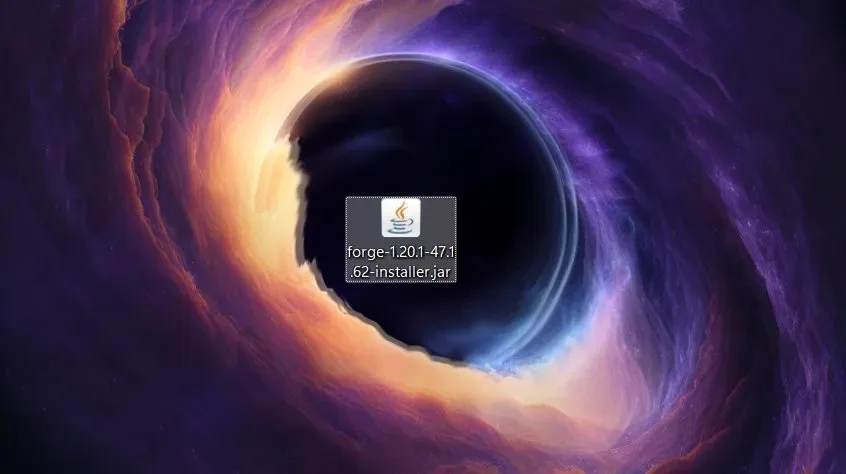
- Choose Install client. Pick the "Install client" option. The install path should already point to your
.minecraftdirectory, so leave it alone unless you moved your game folder.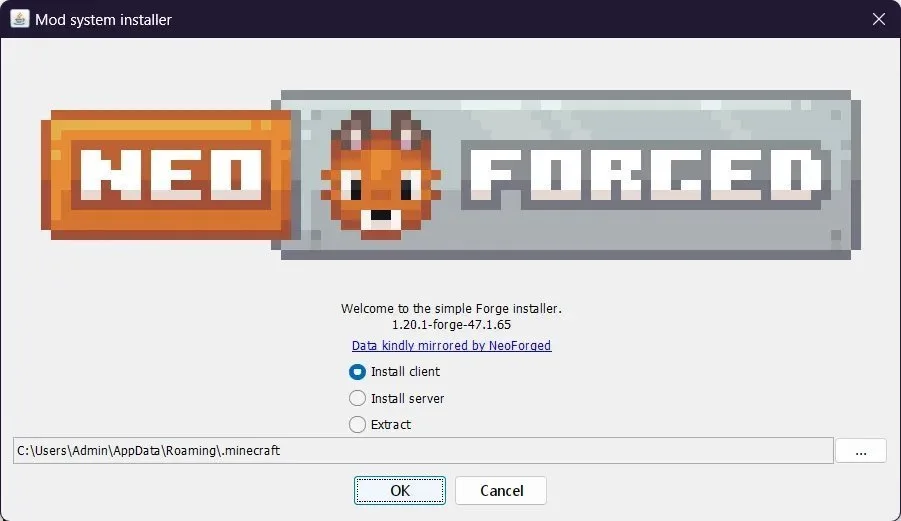
- Start the install. Confirm your choice. The installer extracts what it needs and downloads the rest, so give it a moment.
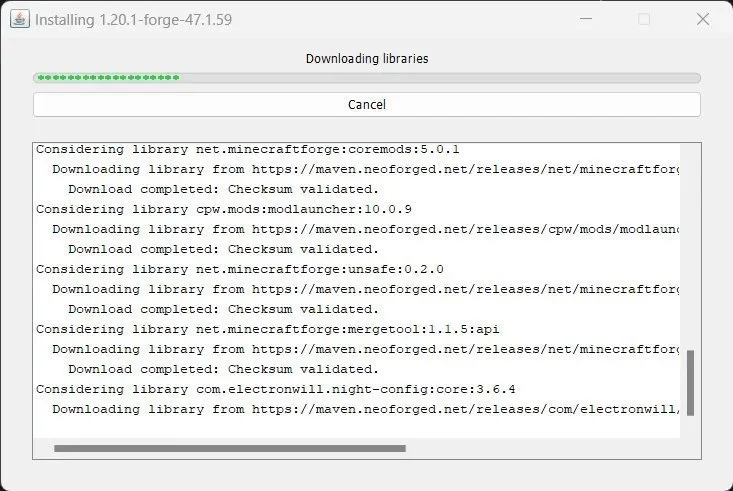
- Read the confirmation. You will see a success message when it finishes. Click OK to close the installer.

- Open the launcher and pick the profile. Launch the Minecraft launcher and switch to the Installations tab. The new NeoForge profile should appear, often grouped under a "Modded" filter. If it is missing, rerun the installer with the launcher closed.
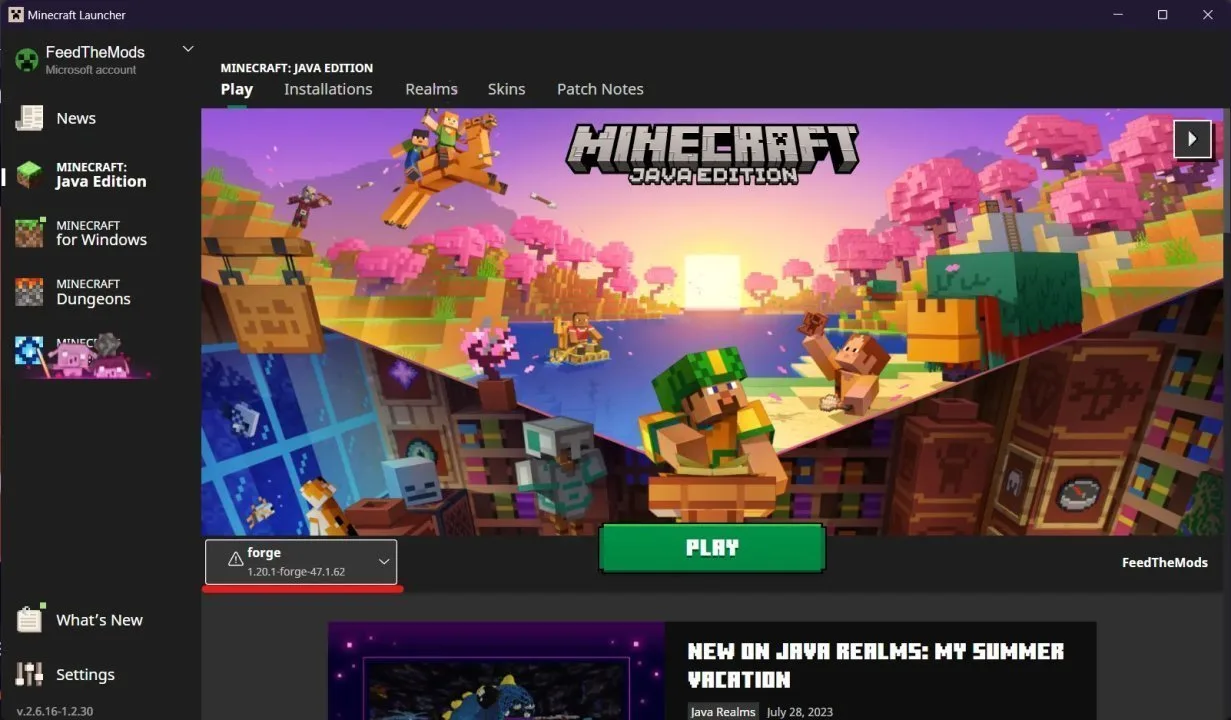
- Press Play. Click Play on the NeoForge profile. When the main menu loads, the loader name shows in the lower-right corner, which confirms everything worked.
Download NeoForge
If you want to download mods that are compatible with NeoForged check out this page:
Adding Mods Once NeoForge Is Running
Installing the loader is only step one. To actually run mods, open your .minecraft folder (on Windows that is C:\Users\<you>\AppData\Roaming\.minecraft, on macOS it lives in ~/Library/Application Support/minecraft). Look for a folder named mods, or create one if it does not exist. Drop compatible .jar files inside, then relaunch the game. A Mods button appears on the main menu and lists everything you added.
One common mistake is dropping a Fabric-only or Quilt-only mod into a NeoForge install. Those will not load. Always check that a mod lists NeoForge (or Forge, where compatible) before you add it.
NeoForge Compared With Other Loaders
NeoForge is not the only loader, and it is not always the right one. The short version is that mods are built for a specific loader family, so the mod you want decides which one you install.
- Forge is the older project NeoForge forked from. Some mods still target Forge only. See our Minecraft Forge guide.
- Fabric is a lighter, faster-moving loader popular for snapshot mods. See Minecraft Fabric.
- Quilt is a Fabric-compatible alternative with its own ecosystem. See Quilt loader.
- For shader fans, how to install OptiFine and how to install Iris cover the graphics side.
Want the deeper background on the project itself? Read the NeoForge project overview.
Common Install Problems and Fixes
Most NeoForge install issues trace back to Java or the launcher. If the installer will not open, you almost certainly need to install a 64-bit Java that matches your Minecraft version. If the profile never appears in the launcher, rerun the installer with the launcher fully closed. If the game crashes on startup, double-check that your mods are actually NeoForge-compatible and that they match the Minecraft version you launched. Out of memory errors usually mean you are still running 32-bit Java, so switch to the 64-bit JDK.
Frequently Asked Questions
Is NeoForge the same as Minecraft Forge?
No. NeoForge is a fork of Forge started by several original Forge developers, and the two have diverged. Some mods support both, but many newer mods target NeoForge only, and many older mods target Forge only. Install the one your mod asks for.
Do I need to install Java before running the NeoForge installer?
Yes. The installer is a Java application, so it will not open without Java installed. Use the 64-bit JDK, and pick Java 21 for newer Minecraft releases or Java 17 for older ones. Run java -version to confirm before you start.
Where do I put mods after installing NeoForge?
Place compatible .jar files in the mods folder inside your .minecraft directory. Create the folder if it is missing, then relaunch the game. The Mods button on the main menu lists everything that loaded.
The NeoForge profile is not showing in my launcher. What now?
Close the launcher completely and rerun the installer. The installer writes the profile into the launcher's config, and that write can fail when the launcher is open or when the install path is wrong. If it still does not appear, check that the install path points at your real .minecraft folder.
Can I use Fabric or Quilt mods with NeoForge?
No. Mods are built for a specific loader family, and Fabric or Quilt mods will not load under NeoForge. If a mod you want is Fabric-only, install Minecraft Fabric or Quilt loader instead and run it there.
Discussion
No comments yet
Be the first to start the discussion.


