

Decorative Bottles | Placeable Bottles Mod
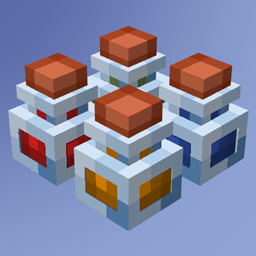
Decorative Bottles turns any potion or glass bottle into a placeable block, so you can dress up shelves and bars with up to four rendered bottles per block.
 Forge
ForgeDecorative Bottles is a small Forge mod from creator broglii that turns every potion, glass bottle, and honey bottle in your inventory into a placeable decoration. The idea is simple: crouch and right-click on a flat surface while holding a bottle, and that bottle drops onto the block as a rendered item with its contents visible inside. It is a decoration-first mod aimed at builders who want shelves, bars, alchemy labs, and kitchens to look lived in.
Place Potions and Bottles as Decorative Blocks
The core mechanic is placement. While crouching, right-click on the top of a block with any vanilla bottle or potion in hand and it snaps into place as a decorative block. The mod supports standard glass bottles, potion bottles (including splash and lingering variants), honey bottles, and dragon breath, so anything you can drink you can also display. Up to four bottles can share a single block space, which means a one-block shelf can hold a tidy row of four potions without eating extra room.
What makes the placement feel good is the rendering. Each placed bottle shows the liquid inside at the correct fill level, so a near-empty potion looks near-empty and a full honey bottle looks full. That small detail is what turns a row of bottles from items sitting on a counter into something that reads like a real alchemist's shelf.


Stacking Four Bottles in One Block
The four-bottles-per-block limit is the main building trick. Pair it with blocks that have a flat top (tables, slabs, upside-down stairs, plain bookshelves) and you can line up a full apothecary wall in a few minutes. Because the bottles sit on the block rather than replacing it, you can build the shelf first and then dress it. The crouch requirement also keeps you from accidentally placing bottles when you just want to use one, which is a nice safety net during normal play.
Installing Decorative Bottles
Because this is a Forge mod, the install path is the standard one:
- Install Forge for the loader profile your pack uses, then launch the game once with that profile to generate the mods folder.
- Download the matching Decorative Bottles JAR for your setup.
- Drop the JAR into your
.minecraft/modsfolder and relaunch the game.
For a deeper walkthrough on the loader itself, the how to install Minecraft mods guide covers the folder structure and profile setup. There are no required dependencies beyond the loader, so the JAR works on its own.
Decorating Ideas for Builders
The mod earns its keep in themed builds. A wizard's tower looks better with potions lined up on every floor. A tavern can stock a back bar with honey bottles as mead stand-ins. Storage rooms get a label-free visual inventory when you place the actual bottles near their chests. It also pairs well with other detail mods such as Dusty Decorations for clutter and Meme in a Bottle for a sillier shelf, since none of them override the same blocks.
Frequently Asked Questions
How do I place a bottle? Crouch and right-click on the top of a block while holding any vanilla bottle or potion. Up to four bottles fit in a single block space.
Which bottles can I place? Glass bottles, all potion types, honey bottles, and dragon breath. Anything vanilla that counts as a bottle works.
Is Decorative Bottles still maintained? The last release shipped in November 2023, so the project has been quiet for a while. The placement mechanic still works on the versions it was built for. Check the project page for current status.
Compatibility & downloads
Discussion
No comments yet
Be the first to start the discussion.


