

Gamingbarn's Morphs | Morph Into 60 Minecraft Mobs
Gamingbarn's Morphs lets you transform into around sixty Minecraft mobs with a single chat command, complete with Shift abilities and server config options.
 Fabric
 Forge
Forge NeoForge
 Quilt
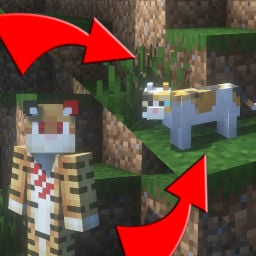
QuiltPlaying as a mob is one of those ideas every Minecraft player eventually has. Plenty of shapeshifting mods ask every player to install files, and some rewrite your stats the moment you transform. Gamingbarn's Morphs skips both problems. It's a command-driven datapack at heart that lives on the server, so anyone on the world can open a chat menu and morph without installing a thing. With roughly 179,000 downloads and an update in June 2026, it's a popular pick that's still actively maintained.

How the /trigger morph Menu Works
Everything runs through chat. Type /trigger morph and a menu of mob options appears. Press [T] to open chat again so the items become clickable, then click the mob you want and you transform on the spot. There are no items to craft and no client-side setup for players.
The official docs count around sixty different morphs, and every player on the world can use them by default. No unlock grind and no cost. If you want a different look rather than a different body, that's what the skins menu is for.
Shift Abilities: Eggs, Flight, Fangs, and Burrows
Morphs are more than costumes. Hold [Shift] and many of them trigger a mob-specific ability. The chicken leaves a trail of eggs behind it and the spider climbs walls. The developer's official datapack page documents the full list, and these are the highlights:
- Flight for the bee, parrot, allay, blaze, and phantom. You fly upward and float gently back down when you stop.
- Fast flight for the vex, with no downward float.
- Pounce for the fox, a boosted jump that deals extra damage when you land on something.
- Fangs for the evoker, which summons attack fangs under nearby hostile mobs.
- Burrow for the silverfish, hiding it inside stone blocks and making it invulnerable while it's hidden.
- Self destruct for the creeper. You explode, and yes, you go down with it.
- Drink milk for the cow, which clears every status effect on you.
- Drink stew for the mooshroom, which restores hunger.
- Eat grass for the sheep, which grazes the block under your feet.
Flight alone changes how you get around a survival world, and the silverfish burrow doubles as an escape button. The creeper ability is exactly as chaotic as it sounds, so maybe test it away from your base.
Skins, Variants, and the Operator Config Menu
Run /trigger skins and a second menu opens for mob variants. It's two steps: pick the mob, then pick the skin. These variants apply to certain morphs, and they stay available even when Kill-Required Morphing is on.
Server owners get real controls too, all in one in-game menu at /function config:gbm. There's no config file to edit. Two admin modes stand out. Operator-Only Morphing locks the menus so only allow-listed players can morph, and you add players with /function gbm:add_player, or run that function on someone else through /execute if you'd rather do it from the console. Kill-Required Morphing turns the pack into a progression system where players can only become mobs they've personally killed. The mod remembers each player's kill history even when you switch that mode off, and skins are never locked behind the kill requirement.
If you want shapeshifting with real mechanical weight, our Woodwalkers guide covers a full mod that changes your stats and size while transformed. Gamingbarn's docs don't list any stat changes, which makes this the lighter option of the two.
How to Install Gamingbarn's Morphs
The project ships as a mod jar for Fabric, Forge, NeoForge, and Quilt, and as a plain datapack zip on the developer's site. The mod route is the simplest for most servers.
- Download the mod file from the download table on this page.
- Install a mod loader on your server. All four are supported, and our Fabric guide and Quilt guide both walk through the setup.
- Drop the jar into the mods folder on the server.
- Restart the server.
- Join the world and run /trigger morph in chat. The server side is required and the client side is optional, so your friends don't need to install anything.
- If you're an operator, run /function config:gbm to open the config menu and set up operator-only or kill-required morphing.
Prefer to skip loaders entirely? Grab the datapack zip from the developer's site and drop it into your world like any other datapack. Stuck or found a bug? The developer runs a Discord server for support and feedback.
Gamingbarn's Morphs FAQ
Does Gamingbarn's Morphs need to be on the server or just the client?
The server side is required. The mod powers the menus, morphs, and abilities, so it has to be installed on the server. The client side is optional, meaning players can join and use /trigger morph without installing anything themselves.
Can I limit who can morph on my server?
Yes. Enable Operator-Only Morphing in the /function config:gbm menu, then add trusted players with /function gbm:add_player. Players not on the list can't morph or see the menus. Kill-Required Morphing is the other option if you'd rather gate morphs behind mob kills.
Does it work on Bedrock or Geyser servers?
That's unverified. The menus are clickable chat messages, which don't translate cleanly to Bedrock clients, and players on Geyser servers have run into this exact problem. No confirmed workaround exists, so treat Bedrock support as a maybe.
Is Gamingbarn's Morphs still maintained?
Yes. It was updated in June 2026 and sits at roughly 179,000 downloads. The project has been public for a few years and is licensed under Creative Commons BY-NC-ND.
One command gets you into a new body, Shift gives that body something to do, and the operator menu keeps it all server-friendly. If you're new to modding, our how to install Minecraft mods guide covers loaders and mod folders from the ground up.
Compatibility & downloads
Discussion
No comments yet
Be the first to start the discussion.


