

MCPings | Tactical Ping Mod
MCPings is a tactical ping mod for Minecraft that marks locations, mobs, and objectives with distance and player name so your team can coordinate fast.
 Fabric
 Quilt
QuiltWhat MCPings Adds to Your World
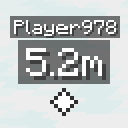
Built by Dyvinia and based on Ping Wheel by LukenSkyne, MCPings keeps the loop simple: place a marker, share it instantly. Every ping carries two pieces of context, the username of the player who placed it and the distance to the flagged spot. That is enough to act on without a chat argument. During a boss fight, a mining trip, or any moment where typing "over here" is too slow, a ping does the job in one click.
Ping Types That Tell You What Was Flagged
Pings adapt to what you point at. The mod ships with several ping types so you can tell at a glance whether someone flagged a player, a mob, or a generic objective, and each type can carry its own color. That visual separation keeps a busy screen readable when four people are pinging at once.
Visibility That Stays Useful
Pings only render for players within a configurable distance, which keeps the HUD clean when a group spreads out. If a ping lands off-screen, an arrow points toward it so you can still track the marker without spinning the camera around.


Setting Up and Configuring MCPings
MCPings runs on Fabric and Quilt, and it needs to be present on both the client and the server. If you are new to loaders, our Minecraft Fabric and Quilt Loader guides walk through installation, and the general how to install Minecraft mods primer covers the mods folder and profile steps.
Once in game, open the config through ModMenu or run /mcpings config. From there you tune the maximum visibility distance, set custom colors per ping type, and adjust the rest of the display options to fit your group.


Server Compatibility for Vanilla Players
A companion plugin lets Paper and Spigot servers pass pings to unmodded clients using text displays, so players who have not installed anything can still see flagged locations. The plugin pairs with MCPings and needs ProtocolLib on the server. Players can opt out with /togglepings if they do not want pings on their screen.
Frequently Asked Questions
Is MCPings still being updated?
The project is archived, so it will not receive new builds unless the author unarchives it. It still works as released, but if you want something actively maintained for newer releases, look for an alternative ping mod that is still in development.
Does MCPings need a server-side install?
Yes. MCPings installs on both the client and the server, so everyone in a multiplayer session needs it to see and send pings. On Paper or Spigot servers, the companion plugin can stand in so vanilla clients can receive pings without the mod.
Can I change the colors of each ping type?
Yes. Open the config through ModMenu or /mcpings config and assign a custom color per ping type, along with the visibility distance and other display options.
Who made MCPings?
MCPings was built by Dyvinia and is based on Ping Wheel by LukenSkyne. The source repo lives at Dyvinia/MCPings on GitHub, where you can also file issues. The project is MIT licensed.
Compatibility & downloads

Discussion
No comments yet
Be the first to start the discussion.


