
Better Advancements | Full-Screen Advancements UI
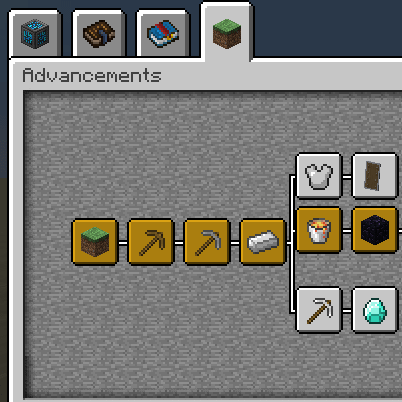
Better Advancements turns Minecraft's cramped advancements window into a screen-filling interface with recolorable icons and cleaner, larger text.
 Fabric
 Forge
 NeoForge
The first time you open the advancements screen with Better Advancements installed, you notice immediately. The tiny default panel is gone. The layout now fills your entire window instead of floating in a small box surrounded by empty screen, and that wasted space was always the vanilla system's biggest sin. Better Advancements is a cosmetic, quality of life mod that fixes exactly those presentation problems, and around 28 million downloads suggest plenty of players agreed.

A Screen-Filling Advancements UI
The headline change is the size. The advancements screen expands to fill your display, which finally gives large modpacks the room they need, since each mod can bring its own tabs and long descriptions. Vanilla keeps that same tabbed UI inside a small fixed window, and everything outside it just sits there blank.
The layout tweaks keep going after the size. Description boxes can grow slightly larger, so longer mod text is easier to read instead of clipped. The title of the tab you are browsing also appears in the title of the advancements UI, which sounds minor until a pack renames every tab and you lose track of where you are.
One limit to know before you install. Panning the advancement tree currently supports vertical dragging only, and horizontal dragging is an open feature request with the developer.
Advancement Icon Colors and Settings
The default advancement icons arrive in gray, blue and orange. If that palette gets old, or clashes with your pack's look, the mod lets you recolor the icons through its configuration instead.
The same config carries the setting that stops the advancements background from fading on hover. Vanilla dims the backdrop the moment you hover an entry, and if that dimming distracts you, the option holds the background steady.
A practical note on editing that config. It is editable in-game, but a reported issue shows saving config changes in-game crashing the game on some setups. Until that gets fixed, edit the config file with the game closed, then relaunch and check the result.
Resource pack makers are covered too. The UI is drawn from three GUI sheets, widgets.png, window.png and tabs.png, and only the widgets sheet differs from vanilla, so an existing pack needs one redrawn sheet to fit. The developer documents the layout, including the grayscale icon rows used for recoloring, on the GitHub wiki.
Multiplayer and Modpack Compatibility
The mod is client-side only. Its supported environment is the client, so nothing gets installed on a server and other players never need a copy. Requests for server-wide advancement syncing have been declined as out of scope, with vanilla's /advancement command suggested for server management instead.
For pack building, the scope stays deliberately cosmetic and quality of life. Pack creators who want custom advancement content are pointed to Triumph, and modders get a public API to build against, with the issue tracker open for visual and functional requests. The track record in big packs is decent too. A bug that hid advancement goals in FTB modpacks was confirmed fixed by the author in October 2024.
One real conflict to flag. Installing Better Advancements disables the custom multi-layer advancement backgrounds from Alex's Caves, the set that swaps through six cave-biome backdrops as you hover its tab. Alex's Caves implements its own advancement tab class, so a proper fix needs support on that side, and the issue is still open as of September 2026, with the Better Advancements author offering hooks. If those backgrounds matter to you, decide before you install. Our Alex's Caves overview covers the rest of what that mod does.


How to Install Better Advancements
The install is standard client mod work, so here is the full path.
- Install a mod loader. Better Advancements ships separate builds for Fabric, Forge and NeoForge, so grab the build matching your pack. If you need the loader itself, our guides for Fabric, Forge and NeoForge each walk a setup from zero.
- Download Better Advancements from the official project page. Pick the file that matches your loader and your game version, both listed on the page.
- Move the jar into your mods folder. If that folder does not exist yet, launch the game once with the loader installed and it gets created.
- Start the game through the loader profile, then open the advancements screen. Because the mod is client-side, this one install is the whole requirement.
Better Advancements FAQ
Does Better Advancements work on multiplayer servers?
It runs entirely on the client and has no server-side component, so the server itself needs nothing installed. Other players only need the mod if they want the bigger UI too. For advancement management on the server side, the author points at vanilla's /advancement command.
Is Better Advancements still updated?
Yes. Development is active, with the last update landing in October 2026. The project has been published for roughly four years as the successor to BetterAchievements.
Can I change the advancement icon colors?
You can. A configuration option replaces the default gray, blue and orange icon palette with your own colors, and it sits in the same config as the background fade toggle.
Does Better Advancements add its own advancements?
No. The scope is cosmetic and quality of life, so advancement content stays untouched. For custom advancements in a pack, the author recommends Triumph instead.
That covers the full picture: a bigger layout, readable text, your own icon colors and nothing forced onto a server. If this is your first client mod, our guide on how to install Minecraft mods covers folder paths and common launch errors next.
Compatibility & downloads
Showing 20 of 24 MC versions.
Discussion
No comments yet
Be the first to start the discussion.


