

Laser Bridges & Doors | Redstone Laser Mod
Laser Bridges & Doors is a Minecraft mod that adds redstone-powered laser bridges, doors, and fences whose length scales with the strength of your signal.
 Fabric
 Forge
Forge NeoForge
 Quilt
QuiltWhat Is Laser Bridges & Doors?
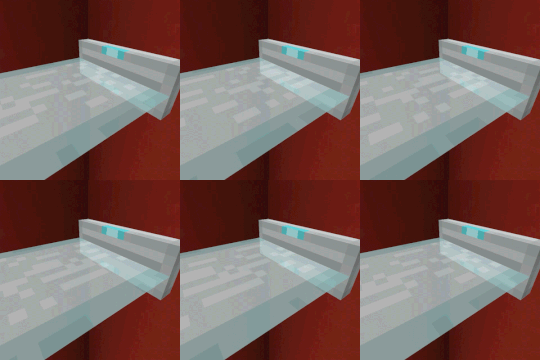
Laser Bridges & Doors is a small redstone and transport mod by Mars built around one clever block, the Laser Source Block. Drop it into a build, hook it to redstone, and it projects a glowing laser platform across a gap or up a wall, a clear nod to the energy bridges from Portal. The block is crafted from a Glass Block and 7 Iron Ingots around an End Crystal, so it slots into a mid-game tech or redstone world without feeling out of place.
The mod is lightweight and MIT licensed, with no required dependencies. You can drop it into most existing modpacks without extra setup.
What the Mod Adds
The headline addition is the Laser Source Block, and its behavior depends on which face you place it against. Orient it horizontally and it throws out a laser bridge you can walk across. Orient it vertically and the same block becomes a laser door or wall that blocks players and mobs until the signal drops.
A second block, the Laser Fence Source Block, works the same way but produces a laser fence instead. You can craft it straight from a regular Laser Source Block and convert it back again, so you never have to commit to one type.
A few extra touches round it out. Click a laser source with dye in hand, or run dye through a dispenser pointed at it, and the laser takes that color. Everything is configurable through an in-game screen or the config/laserbridges.json file, where you can tune max_length (15 by default) and define which blocks the lasers are allowed to cut through.

How Redstone Drives the Laser Length
The laser length tracks the redstone signal strength in real time. Power the block with a lever and you get a fixed bridge. Feed it a signal that ramps up, from a daylight detector, a comparator, or a slowly filling line of repeaters, and the bridge grows block by block as the strength climbs.

That makes the mod genuinely useful for redstone builders, not just decorative. A one-block gap can become a drawbridge, a hidden doorway, or a mob gate that only opens when a specific condition is met.
You can also wire it up as an automated door.

How to Install Laser Bridges & Doors
Installation is the standard mod flow. Pick the build that matches both your Minecraft version and your loader, then drop the jar into your mods folder.
- If you are new to modded Minecraft, start with our how to install Minecraft mods walkthrough.
- Already on a modern loader? The mod runs on Fabric, NeoForge, and Quilt, so use whichever your world already uses.
- If you prefer Forge builds, see the Forge guide for the matching version.
After the first launch, check the in-game config screen to set the max laser length and tweak which blocks the laser can pass through. Defaults are sane, but the option is there if you want longer bridges or want lasers to ignore certain decorative blocks.
Frequently Asked Questions
How long can a laser bridge get?
The default max_length is 15 blocks, so a full-strength redstone signal produces a 15-block laser. Raise the value in the config file or the in-game screen if you want longer spans.
Can I color the lasers?
Yes. Right-click a Laser Source Block with any dye in hand, or point a dispenser at the block and feed dye into it. The laser takes the dye color and keeps it until you recolor or replace the block.
Does it work on servers?
It does. The mod is client and server compatible, so bridges and doors behave the same whether you are testing in single-player or running a multiplayer server.
Related Mods
If you like the Portal-style energy aesthetic, Immersive Portals takes the same idea further with see-through portals you can walk straight through. For more laser-themed builds, Laser Mod adds working lasers for mining and combat. And for fast point-to-point travel that pairs well with a laser bridge network, Create Hypertubes is a fun companion.
Compatibility & downloads

Showing 20 of 32 MC versions.
Discussion
No comments yet
Be the first to start the discussion.


